Rotary kiln monitoring software

IRT KilnMonitor

See your kiln clearly, rotation after rotation.

Bring shell temperatures, alarms, and operating history into one workspace. IRT KilnMonitor combines thermal views with refractory and coating estimates to help you locate hot spots, follow changes, and plan maintenance with a record of kiln conditions.

Shell temperature maps · Alarms & cooling control · Refractory history

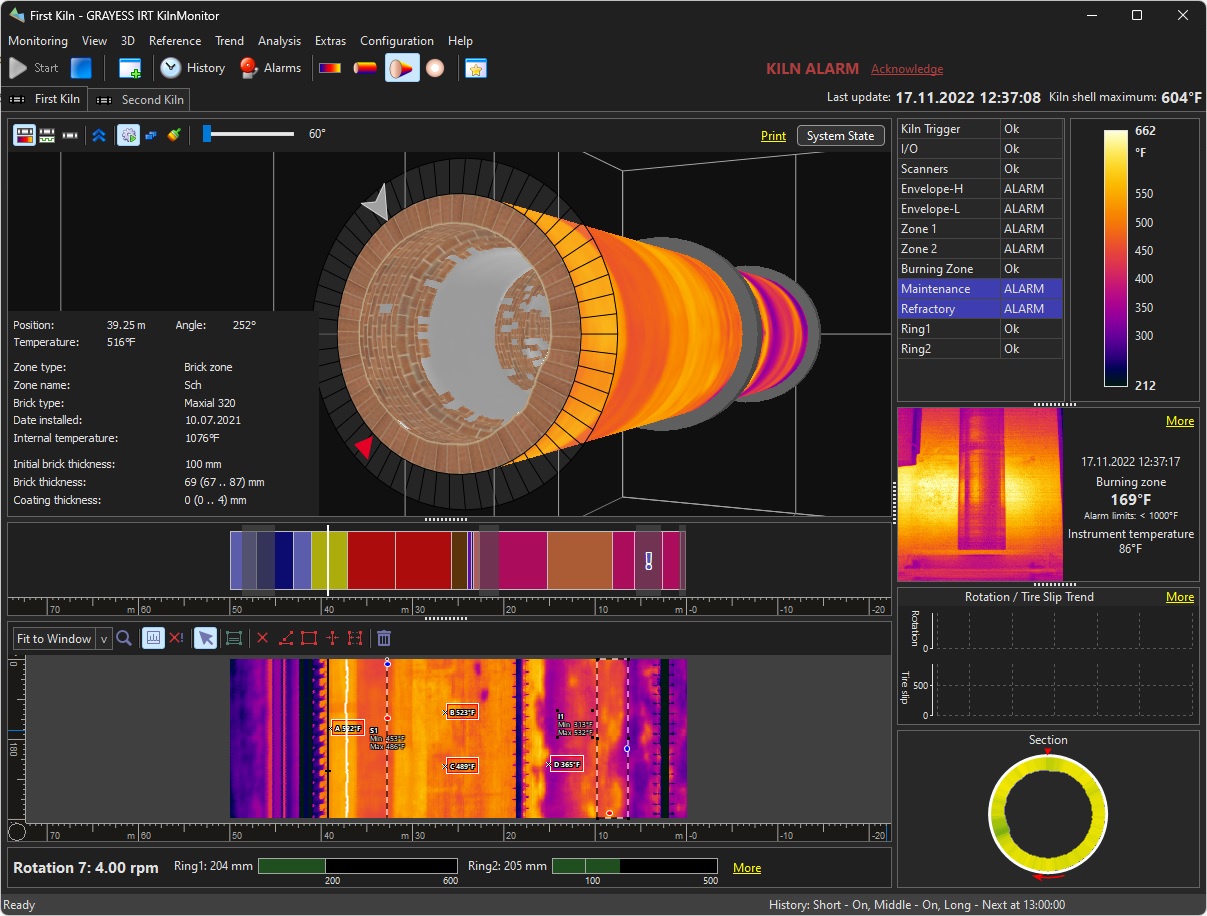
IRT KilnMonitor workspace showing a 3D kiln section, shell temperature map, refractory zones, alarms and tire-slip monitoring

Understand the condition of your kiln

Monitor. Compare. Plan.

See where temperatures change, respond to configured limits, and connect today's kiln condition with its operating history. Explore the tools built for rotary kiln monitoring.

Put shell temperatures in context.

Build a temperature map around the kiln circumference as it rotates. Combine infrared line scanners or thermal cameras, with additional sensors for shadowed areas, into a common view of the monitored shell.

  • Locate hot spots with zoom, spot measurements, lines, areas, and horizontal profiles.
  • A new shell map is assembled after each full revolution, using the kiln rotation trigger.
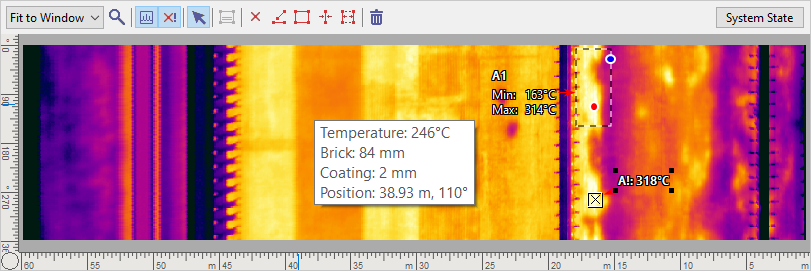
KilnMonitor shell temperature map with area and spot measurements, kiln position and estimated brick and coating values
Locate temperature changes along the kiln and around its circumference. View screenshot

Set the limits. Control the response.

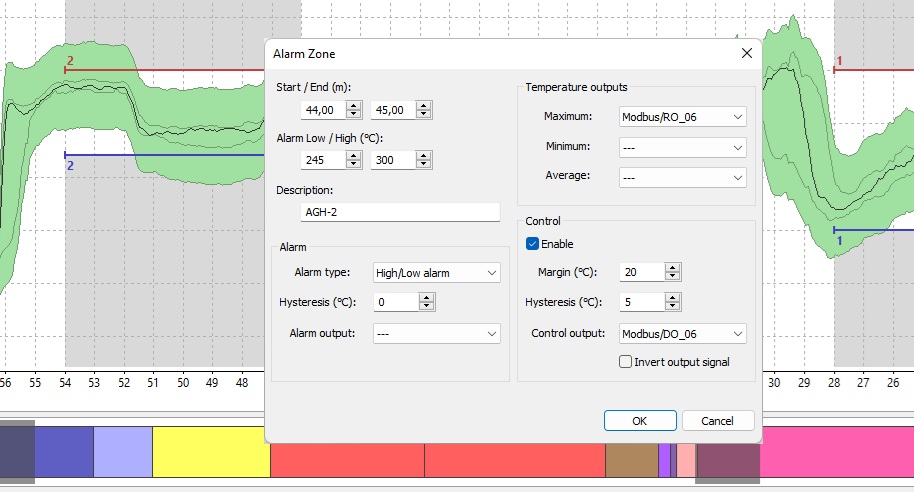
Configure high and low temperature alarms for kiln zones, or compare the shell profile with a reference envelope. Use separate control thresholds to activate cooling before an alarm limit is reached.

  • Set control margins and hysteresis to suit the monitored zone.
  • Connect alarm and cooling outputs through I/O hardware.
KilnMonitor alarm-zone dialog with high and low limits, hysteresis, temperature outputs and separate control settings
Define zone alarms and a separate cooling-control response. View screenshot

Follow tire slip and kiln rotation

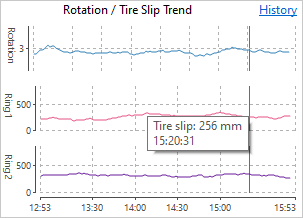
Track differential movement between the kiln and its supporting tires. With kiln and tire rotation sensors connected, KilnMonitor calculates slip for each tire and checks it against configured limits.

  • Review tire-slip and rotation trends together, including historical values.
  • Average successive measurements and monitor missing signals or delayed updates.
KilnMonitor trend showing kiln rotation and slip measurements for two tires
Compare each tire's slip with the kiln rotation trend. View screenshot

Explore the shell, lining, and coating in 3D.

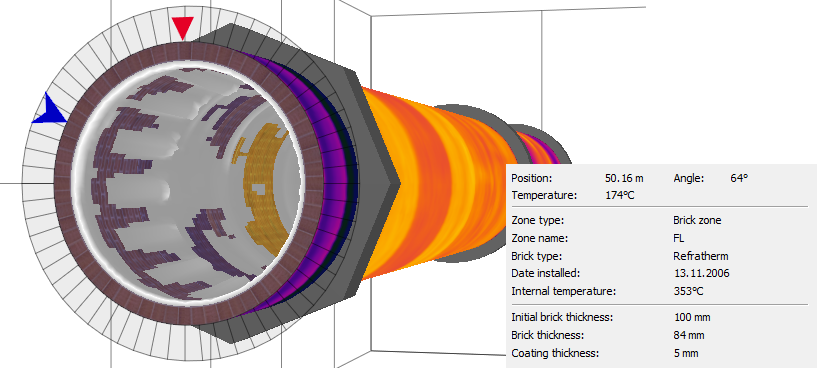
Rotate the virtual kiln, separate it by refractory zones, or move a cross-section along its length. View shell temperatures alongside calculated estimates of remaining brick thickness and coating build-up.

  • Inspect the estimated lining and coating at a selected position and angle.
  • Thickness estimates use shell temperatures, configured material properties, and campaign calibration.
KilnMonitor 3D cross-section showing the thermal shell, refractory lining and calculated brick and coating thicknesses
Explore estimated brick and coating thickness in a movable kiln section. View screenshot

See how kiln conditions develop

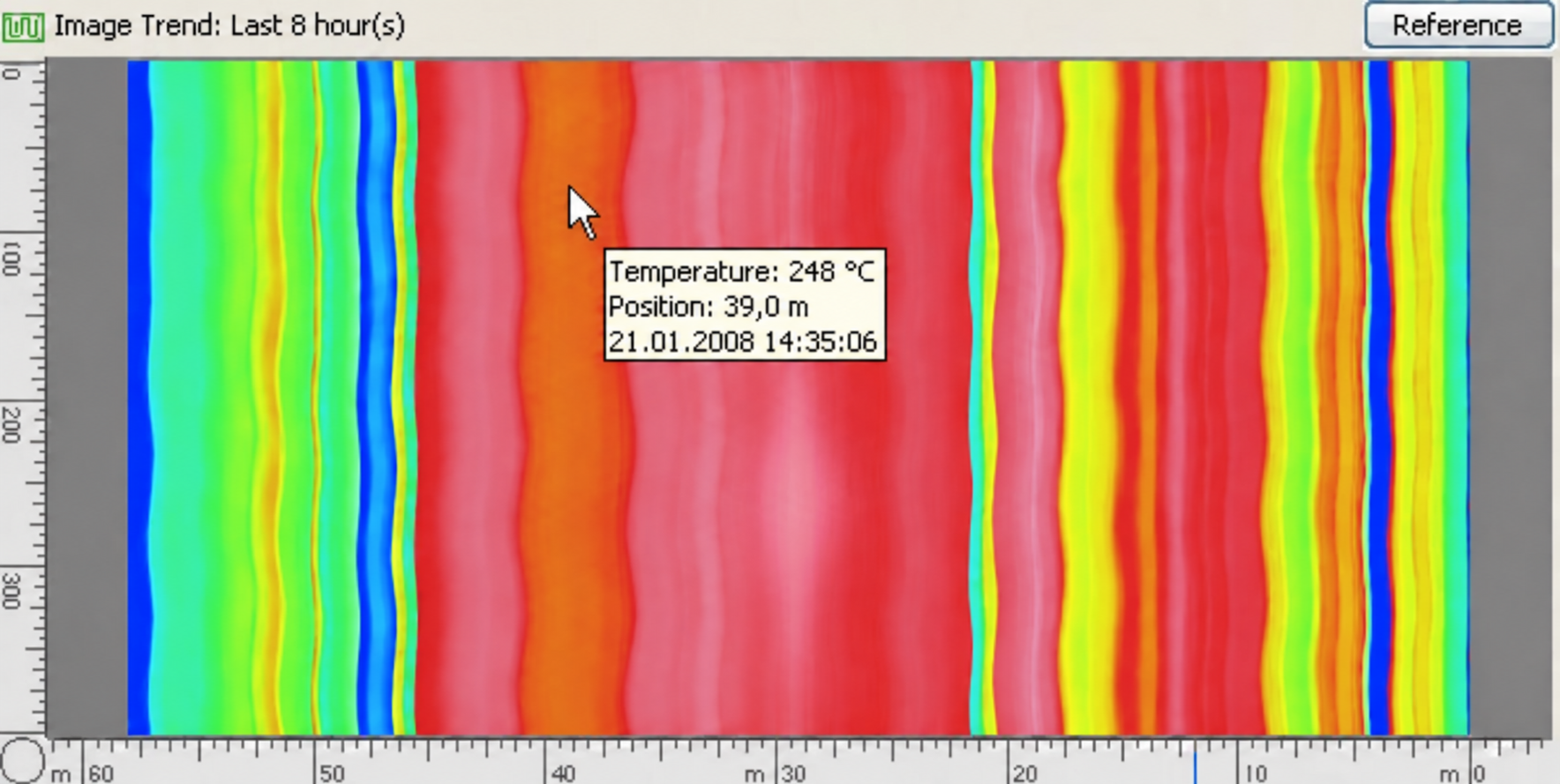
Record kiln states on short-, middle-, and long-term schedules. Review saved thermal maps, follow temperature trends, and use an image trend to see how temperatures along the kiln change over time.

  • Compare with a saved reference or a worst-case map built from recorded history.
  • Save additional states when zone or envelope alarms activate, and label states for later investigation.
Illustrative KilnMonitor thermal history with a localized hot spot building up and fading over time
See where heating patterns persist or change through the recorded period. View screenshot

Keep the refractory history together

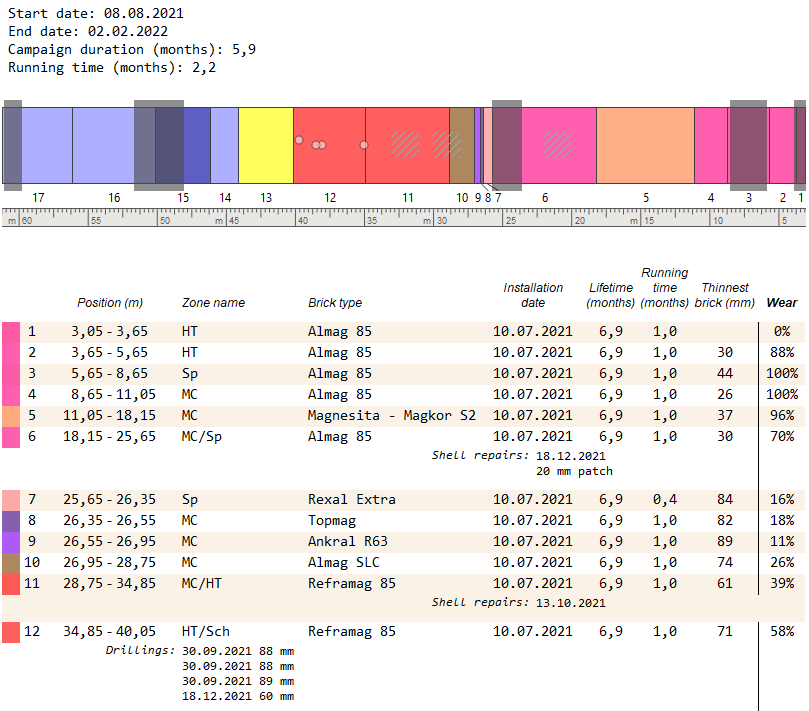
Maintain a record of kiln campaigns, brick-zone replacements, shell repairs, and drilling measurements. Refractory reports bring installation dates, service history, and estimated wear together for maintenance review.

  • Compare the active campaign with earlier campaigns and track changes by brick zone.
  • Generate monitoring reports for a chosen period, covering temperatures, alarms, tire slip, and additional measurements.
KilnMonitor refractory report showing zone locations, installation dates, service times, estimated thickness, wear, shell repairs and drilling records
Review refractory zones and recorded maintenance within a campaign. View screenshot

Bring related temperatures into view

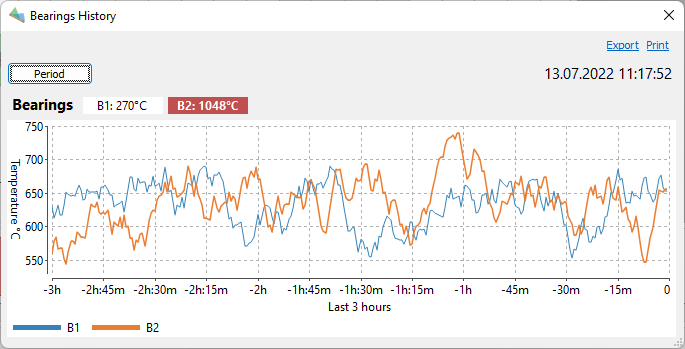
Monitor burning-zone and bearing temperatures alongside the kiln shell using configured temperature instruments. Set limits for these additional measurements and review their trends and history in the same software.

  • Use pyrometers or thermal cameras for burning-zone temperature monitoring.
  • Monitor bearings or other named components with connected pyrometers.
KilnMonitor demonstration of a bearing-temperature history chart with two measurement channels
Review temperature history from additional monitored components. View screenshot

Share kiln data across your plant

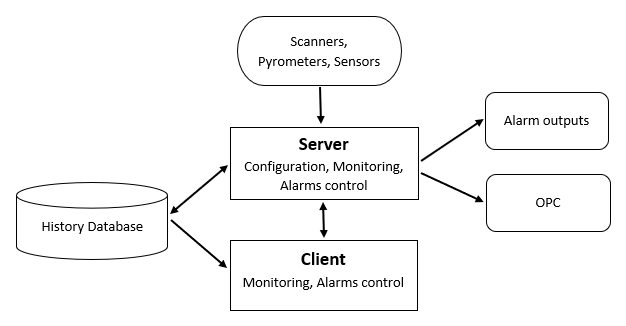
Monitor multiple kilns and make current views and history available to client workstations on the local network. Connect kiln measurements and alarm states to other plant systems.

  • Use OPC Classic or OPC UA.
  • Export image and trend data, or access saved kiln-state files and the monitoring database.
KilnMonitor client-server diagram connecting instruments, history storage, monitoring clients, alarm outputs and OPC
Connect monitoring workstations, instruments, and plant interfaces. View screenshot

Feature overview

From each rotation to the full campaign.

Configure the thermal view, alarms, storage, and plant connections around your installation. Available features, inputs, and interfaces depend on the connected hardware and software license.

Read the instruction manual
Shell imaging & analysis 6 features
  • Multiple line scanners, thermal cameras, and pyrometers in a composite shell map
  • Rotation-triggered mapping with compensation for viewing geometry and changes in rotation speed
  • Zoom, spots, hot-spot markers, lines, areas, slices, and intervals
  • Horizontal temperature profiles and reference-envelope comparison
  • Rotating 3D kiln, split brick-zone views, cross-sections, and end views
  • Temperature and estimated brick/coating information at selected shell positions
Alarms & operating measurements 6 features
  • Zone high/low temperature limits and reference-envelope alarms
  • Separate control margins, hysteresis, and configured outputs for cooling control
  • Visual and audible alarm indication with acknowledgement
  • Kiln rotation and tire-slip trends with configurable limits and signal monitoring
  • Burning-zone and bearing temperature displays, alarms, and history with additional instruments
  • Instrument, rotation-trigger, I/O, maintenance, and refractory status indication
History & refractory management 9 features
  • Short-, middle-, and long-term history with configurable recording schedules
  • Additional short-term records when new zone or envelope alarms activate
  • Manual state saving and labels for significant kiln conditions
  • 2D history playback and manual inspection of saved states in 3D
  • Minimum, maximum, and average temperature trends for monitored analysis objects
  • Image trends and comparisons with saved reference or historical worst-case maps
  • Calibrated estimates of remaining brick and coating thickness
  • Campaigns, refractory replacements, drilling records, and shell repairs
  • Monitoring and refractory reports for selected periods or campaigns
Plant connections & data access 7 features
  • Multiple kilns on one monitoring server
  • Network clients for current monitoring and historical review
  • OPC Classic and OPC UA interfaces
  • Analog and digital I/O for temperatures, alarms, and control outputs
  • CSV and text export of measurement data; PNG and JPEG export of views
  • Scheduled kiln-image export, including every rotation when configured
  • Saved kiln-state JSON, shell-temperature CSV, and SQLite monitoring data for external applications

Plan your installation

Your kiln, instruments & network

Measurement hardware

Choose supported line scanners or thermal cameras for shell coverage and a kiln rotation trigger. Shadow-area measurements, tire slip, burning-zone and bearing monitoring need suitable additional instruments or sensors.

Windows workstation & storage

Use an Intel or AMD Windows PC with resources sized for the number of kilns, instruments, client workstations, and retained history. Plan disk space and network access around the recording schedule and history you need.

Configuration & integration

Confirm device support and the I/O needed for alarm or cooling outputs. Configure refractory materials and calibrate thickness estimates against known lining conditions at the start of a campaign.

Discuss your installation

Plan your monitoring system

Make kiln condition easier to follow.

Tell us about your kiln layout, existing instruments, and plant interfaces. We can help you assess the setup and explore IRT KilnMonitor with the measurements your team needs.

Product screenshot